
Acubiz – automated expense management
Document People implements and operates Acubiz for your business – from mobile receipt scanning to travel reporting and approval in your ERP system.
Mobile receipt scanning
Employees photograph receipts with their phone – data is extracted automatically.
Company card reconciliation
Company card transactions are automatically matched with receipts and expense records.
Travel expense reporting
Mileage allowance, per diems and travel expenses combined in one simple report.
Payroll & ERP integration
Approved expenses are automatically transferred to your payroll and ERP system.
Let Acubiz and Document People take care of all your expenses
With Acubiz, expense management is digital and efficient:
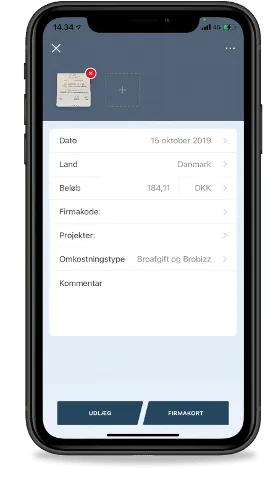
- Take a photo of the receipt to register the expense.
- Fill in a few details – expense type and an optional comment. (Amount, country and currency are extracted automatically from the receipt using OCR technology.)
- The entry is completed and sent for approval.
- The approver checks the expense and approves it via Acubiz's mobile or web application.
- The finance department receives the expense digitally and prepares it for posting in the web application.
- Posting and reimbursement of the expense happen automatically.
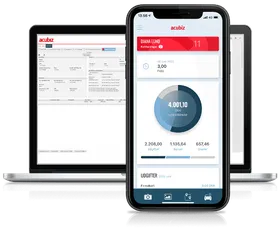
Company card purchases in Acubiz
With Acubiz, employee expenses paid with a company card are handled quickly and digitally:
- Make a purchase using the company card as payment.
- Take a photo of the receipt right away and enter the purpose, plus an optional expense type, project, department or other details.
- The entry is completed by selecting "Company card" and is then sent for approval.
Because the company cards are integrated with Acubiz, the receipt and the card transaction are automatically matched in the system.
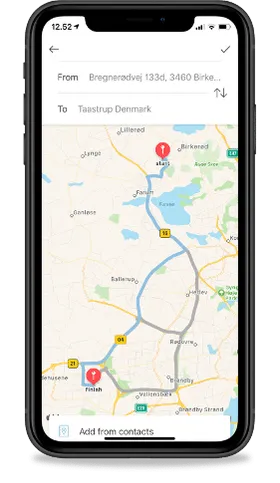
Mileage registration in Acubiz
Registering mileage can be done in two ways on the phone – automatic tracking or manual entry:
- Tap the plus icon at the bottom of the screen and tap the car icon.
- Tap "start trip" when the trip begins.
- Tap "end trip" once you've reached your destination.
- Fill in the relevant details – purpose and an optional project or comment.
- Submit and send for approval.
The finance department receives the data digitally for export to the payroll system.
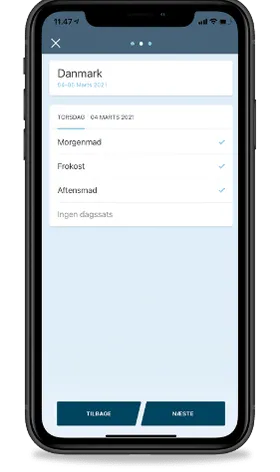
Per diem registration in Acubiz
It should be quick and easy for employees to register the expenses that arise while doing their job. That also applies to registering per diems for business trips.
- Tap the plus icon at the bottom of the screen and select "per diems".
- Enter the trip's start and end dates, country, destination and optional project.
- Select meals for each day of the trip.
- Send the per diem registration for approval by tapping "Submit".
Project hours in Acubiz
Companies have different needs and requirements for a solution to register projects or cases. Acubiz has two modules for this purpose: Basic for straightforward time registration, and Advanced for detailed time registration.
- Tap the Time icon (the small clock) at the bottom of the app, or tap the plus icon and then "time registration".
- Select the relevant time registration category (either a general project category or specific projects).
- Choose either number of hours or days, depending on your company's setup.
- Send for approval by tapping "Submit".
Advanced creates better overview and structure for project hours.
Combine with Rillion

Get expenses and invoices in the same flow
Most of our customers use Acubiz together with Rillion for invoice management – for one combined overview of the entire company's finances.
See the combined solution →Make everyday work easier
Book a demo and find out how Document People can automate your expense and travel reporting.